Plaasjapie logo

How it works

One farm, one day, from field to figures.

Meet Jan, who farms 1 400 hectares of maize and grazing with four tractors, a sprayer and two drivers. This is his week on Plaasjapie — every screen he touches, in order.

  1. Step 1 · Farmer

    Map the field

    Jan starts in the farm office. Before a single litre is logged, he draws the lands he works so every cost later has somewhere to land.

    • Search a town or type coordinates and the map jumps straight there.
    • Draw a pivot as a circle, or drop markers to trace an irregular land.
    • Drag any marker to fix a corner — or simply type the size in hectares.
    • Plaasjapie works out the area, so litres per hectare is real, not guessed.
  2. Step 2 · Farmer

    Add the machine and its tag

    Next comes the fleet. The old 6110 tractor gets its details, a photo, and its own tag so nobody logs fuel against the wrong machine.

    • Make, model, registration, tank size and current engine hours.
    • A photo so drivers recognise the machine at a glance.
    • Generate a unique tag ID, write it to an NFC sticker or keep the QR code.
    • Print the sticker for the cab door, or share it to the workshop phone.
  3. Step 3 · Farm manager

    Assign the job

    Monday morning, the manager plans the week: ploughing on Field 5 with the 6110, driver Pieter. No WhatsApp, no scrap paper.

    • Pick the task, the machine, the field and the driver.
    • Pieter opens Plaasjapie on his phone and the job is waiting for him.
    • Status moves from assigned to in progress to done as work happens.
    • Every fuel log during that job inherits the field and the driver.
  4. Step 4 · Driver

    Tap and log at the pump

    At the diesel tank, Pieter holds his phone against the sticker on the tractor. The right machine opens instantly — gloves on, engine running.

    • Tap the NFC tag, scan the QR code, or type the tag ID if the phone is old.
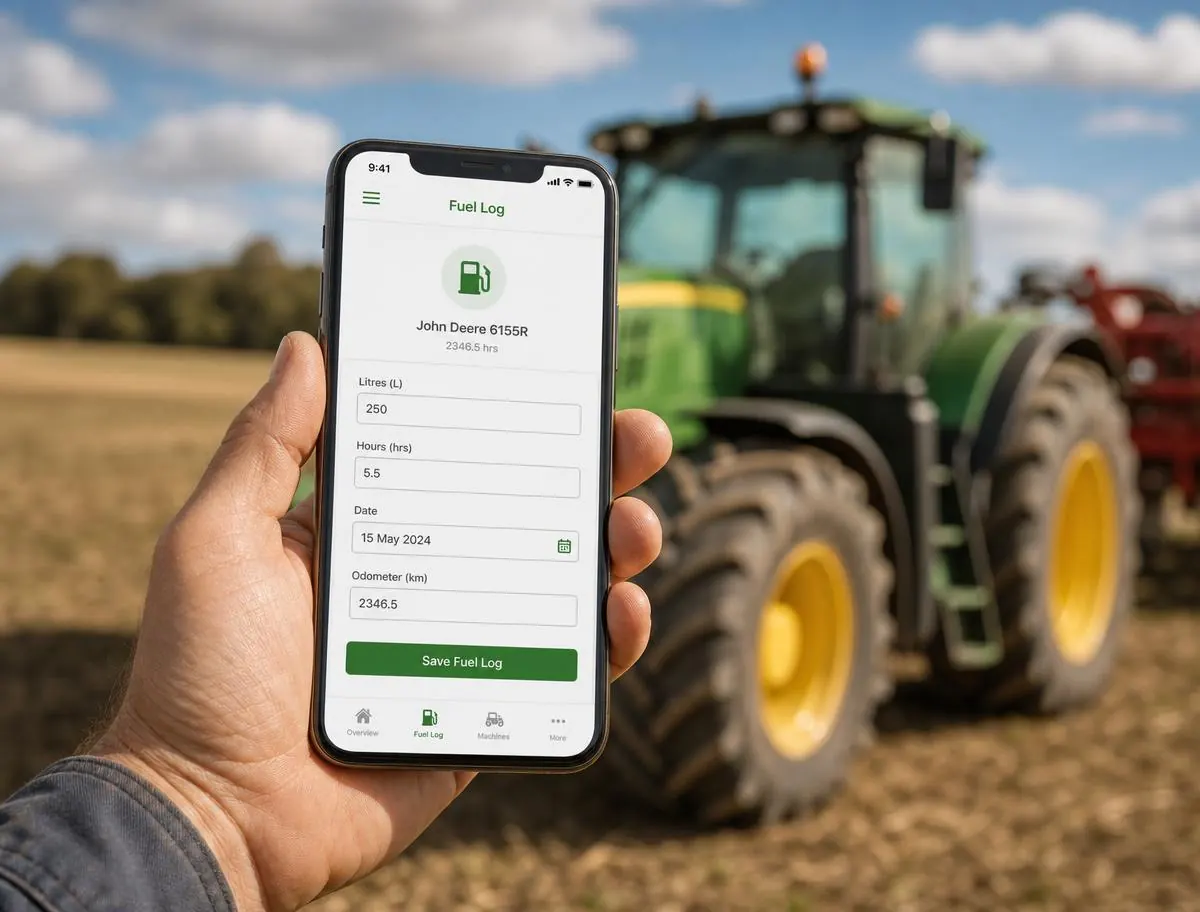
    • Enter litres, engine hours and cost. Under a minute, start to finish.
    • The log is stamped with the machine, job, field, driver and time.
    • Mechanics use the same scan to record a service and set the next interval.
    Plaasjapie mobile fuel log screen on a phone held in front of a tractor
  5. Step 5 · Farmer

    Scan the receipt

    The bulk diesel invoice and the parts slip from town get photographed on the spot. Plaasjapie reads them so Jan does not retype anything.

    • Photograph the invoice; supplier, date, line items and totals are extracted.
    • Check the numbers and correct anything the scan misread.
    • Allocate the cost to a machine, a field or a person.
    • The spend then shows up in the same analytics as fuel and services.
  6. Step 6 · Farmer

    Read the numbers

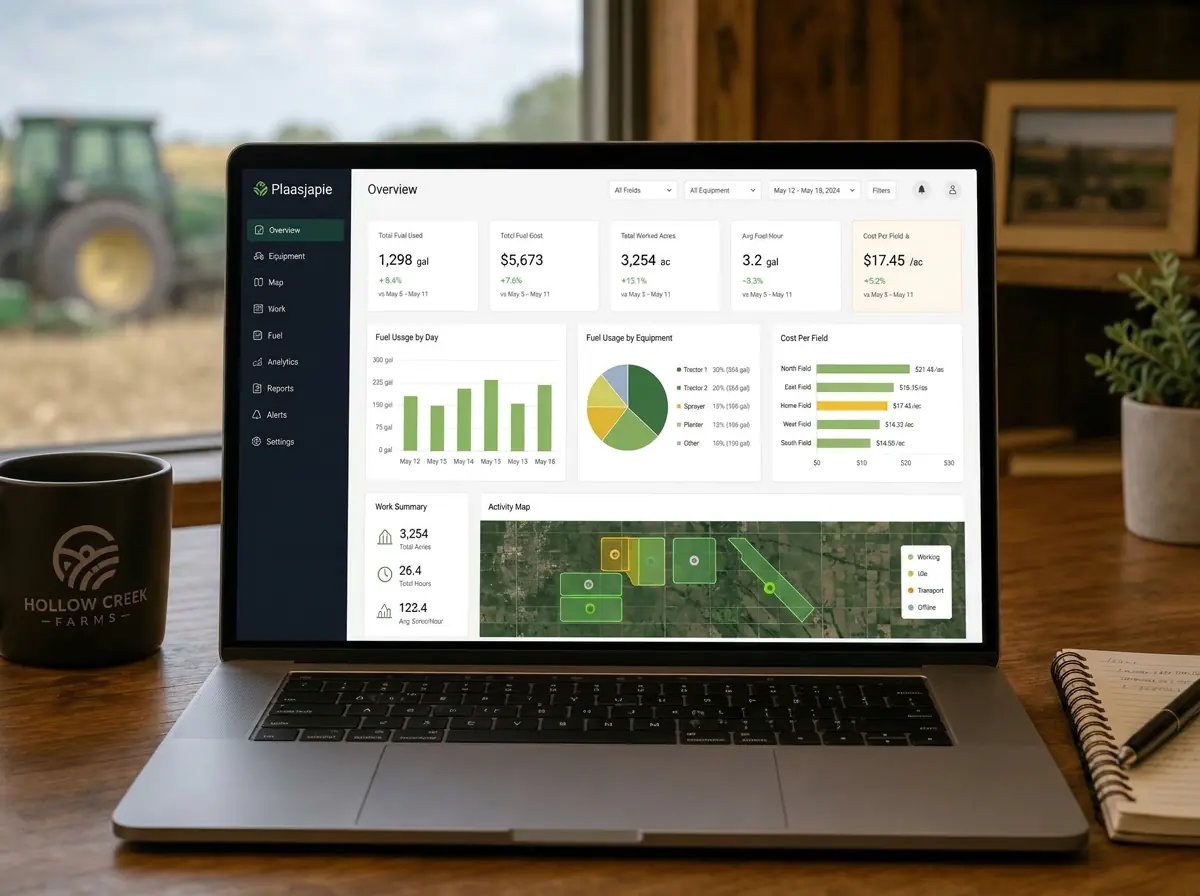
    By month end, Jan does not wonder where the diesel went. The dashboard tells him — per machine, per field, per driver.

    • Fuel over time, spend split and spend by month and category.
    • Litres per hour, cost per hectare and driver efficiency against fleet average.
    • A field map shaded by fuel intensity — click a land to filter everything to it.
    • Service alerts and unusual fills flagged before they become breakdowns.
    Plaasjapie analytics dashboard on a laptop showing fuel charts and cost per field

Who sees what

Permissions keep the phone simple for drivers and the console complete for the office.

Farmer / owner

Full access: fleet, fields, jobs, invoices, team permissions, subscription and every analytics view.

Farm manager

Runs the day to day: adds machines and fields, assigns jobs, manages drivers and reviews the logbook.

Driver / mechanic

Phone only: sees the jobs assigned to them, scans a tag, logs fuel and hours or records a service.

Ready to try it on your own fleet?

Set up your farm, add one machine and print one tag. You will have your first fuel log before the kettle boils.